 Finding a specific file on a Mac can be frustrating when storage contains thousands of documents, folders, images, and downloads. ProFind 1.41 for Mac is designed for users who want more control over file searching than the standard Finder offers.
Instead of manually navigating through folders, ProFind lets you search for files using natural language queries, filters, Boolean operators, file attributes, and content-based searches. It also works with both local and network volumes, making it useful for both personal and professional workflows.
The application is especially appealing to users who manage large document collections. Designers, developers, researchers, photographers, office workers, and power users can use the advanced search options to locate files without remembering their exact location.
ProFind also offers features such as saved searches, OCR-based search, script support, disk caching, and customizable search results. These tools make it much more than a simple filename search utility.
If you regularly spend time searching for files on your Mac, ProFind offers a specific way to make that process faster and more organized.
Features
- Advanced File Search
- ProFind is designed to offer fast and flexible file searching.
- You can search for files by name, extension, size, date, location, and other attributes. This gives you much more control than a basic folder search.
- For example, you can limit results to recently modified large files or locate specific document types within a given folder.
- Natural Language Search
- A useful feature is natural language search.
- Instead of remembering complex search syntax for each task, you can describe what you’re looking for in a more conversational way.
- This makes it easier to find files when you know a file’s characteristics but can’t recall its exact name.
- Boolean Search
- Advanced users can combine search conditions using Boolean logic.
- Operators such as AND, OR, and NOT allow you to create more precise queries.
- This is useful when working with large storage drives, where a simple keyword would yield too many results.
- Searching Within File Content
- ProFind can search within supported files, rather than just checking filenames. This is especially useful when you remember a phrase, keyword, project name, or other information from a document, but can’t recall the filename.
- Searching Network Drives
- ProFind isn’t limited to files stored directly on your Mac.
- It can also search supported network volumes. This is especially useful for offices, home servers, NAS devices, and shared storage environments.
- Users with multiple storage locations can use a single search tool instead of manually checking each mounted drive.
- OCR Search
- ProFind includes OCR-based search capabilities.
- Optical Character Recognition (OCR) helps locate text in images or scanned documents.
- This is particularly useful for users who store invoices, receipts, screenshots, forms, or scanned archive documents.
- Disk Caching
- ProFind can use disk caching to improve search performance.
- Caching can be especially useful when working with large volumes of data, as previously processed information can be reused in subsequent searches.
What’s New
- When working with a specific version of ProFind, such as 1.41, it’s important to distinguish between confirmed version changes and general application features.
- ProFind features include advanced file discovery, search filters, content search, network volumes, OCR, saved searches, caching, and automation.
- Because release notes may differ from the overall feature set, avoid presenting older features as new in version 1.41 unless they are confirmed in the relevant release notes.
- Search Enhancements
- ProFind continues to focus on efficient searching across large file collections.
- Greater Workflow Flexibility
- Advanced search conditions and saved searches help users create repeatable workflows for file searching.
- Optimized Workflow for Power Users
- Scripting and customization features allow power users of Mac to integrate file searching into more complex workflows.
Pros & Cons
Pros
- Advanced file search.
- Powerful search filters.
- Boolean search support.
- Natural language search options.
- File content search.
- OCR-related search features.
- Network drive support.
- Saved searches.
- Disk caching.
- Customizable results.
- Script support.
Cons
- Advanced search features may take some time to master.
- The interface may appear more technical than basic Finder search.
- Some features are more useful for users with large file collections.
- Search performance may depend on storage speed and the number of indexed files.
- Network searches may depend on network and server performance.
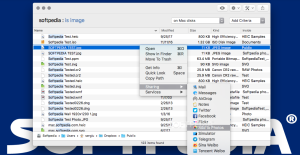
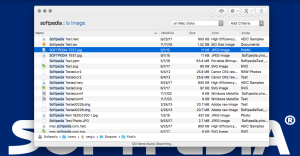
Screenshots:
System Requirements
- Operating system: macOS version compatible with ProFind 1.41
- Processor: Intel or Apple Silicon Mac, depending on the supported build
- RAM: 4 GB minimum; 8 GB or more recommended for extensive searches
- Storage: Sufficient free space for the application and cache
- Network: Required for searching network drives
- Display: Standard Mac resolution
Installation Guide
- Download ProFind
- Download the compatible ProFind installer from the developer or your authorized software source.
- Open the installer
- Locate the downloaded DMG file or application package and open it.
- Launch the application
- Open Finder > Applications and double-click ProFind.
- Grant the necessary access
- Advanced file search applications may need access to certain locations on your Mac.
- Review your macOS privacy settings and grant only the necessary permissions for the folders or drives you want ProFind to search.
- Select Search Locations
- Choose the local or network volumes you want to include in your searches.
- Create Your First Search
- Enter a filename, keyword, or search criteria and review the results.
- Save Your Useful Searches
- If you frequently perform the same search, save it for quick access later.
Benefits
- Find Files Faster
- ProFind’s biggest advantage is simple: it reduces the time you spend searching for files.
- Ideal for Large Hard Drives
- A small Mac can be easy to manage manually. ProFind’s advanced filtering makes navigating large collections easier.
- Search Within Documents
- Searching by filename isn’t always enough.
- Useful for Researchers
- Researchers often work with hundreds or thousands of PDFs, notes, spreadsheets, and reference documents.
- ProFind can help you locate specific material based on filename, content, dates, and other attributes.
- Useful for Office Work
- Office users can use saved searches to locate recently modified reports, invoices, presentations, spreadsheets, and documents.
- This can make repetitive document management more efficient.
- Better Organization of Photos and Media Files
- Photographers and media file users can search large collections based on file properties and location.
- Useful with Network Storage
- Users with NAS devices or shared network folders can benefit from the ability to search across network locations.
Performance Review
ProFind 1.41 for Mac is designed for users who are no longer satisfied with basic file search tools.
Its main advantage is flexibility. It’s not limited to simply entering a filename and hoping the correct one appears. Instead, you can combine various conditions and narrow down your search results.
For everyday searches, this can make a big difference.
Suppose you’re looking for a PDF you recently edited but can’t remember where you saved it. Instead of opening multiple folders, you can combine file type, modification date, and other conditions to reduce the number of results.
The content search function is also very useful.
A filename often provides very little information about a document’s content. Being able to search for relevant text offers another way to find information.
For users with scanned documents, OCR adds an extra layer of utility. Searching for text within compatible images or scanned material can be especially helpful for digital files.
Network support further expands the application’s usefulness.
Many Mac users store files on external drives, NAS devices, or shared folders. Being able to search these locations from a single application saves time.
The application’s caching system is also helpful for repeated searches. Large file collections naturally require more processing, so caching makes frequent searches easier.
However, ProFind isn’t for everyone.
If you only have a few folders and rarely lose track of files, Finder might already offer everything you need. ProFind becomes more valuable as the size and complexity of your file collection increases.
The same is true for its advanced search syntax. Beginners may need some time to understand Boolean conditions and more granular filters. However, once mastered, these tools can make searches much more precise.
In short, ProFind is considered a professional file search utility for Mac users who need greater control over their storage.
FAQs
- What is ProFind 1.41 for Mac?
- ProFind 1.41 is an advanced file search utility designed to help Mac users find files and folders using detailed search criteria, filters, content searches, and other tools.
- Is ProFind better than Finder?
- For basic searches, Finder may be sufficient. ProFind is geared toward users who need more advanced filtering, Boolean queries, content search, saved searches, and other professional search features.
- Can ProFind search inside files?
- Yes. ProFind offers content-based search for supported file types.
- Does ProFind support network drives?
- Yes. ProFind can work with supported network-mounted locations, making it useful for NAS and shared storage environments.
- Can ProFind search scanned documents?
- It offers OCR-related search functionality, which can help locate text contained in scanned or image-based documents.
- Does ProFind support Boolean searches?
- Yes. Boolean search conditions allow you to create more precise queries.
- Can I save searches in ProFind?
- Yes. Saved searches allow you to retain your most frequently used search conditions.
- Is ProFind suitable for large hard drives?
- Yes. Its advanced filters, content search, and caching features make it especially useful for large collections of files.
- Does ProFind work with Macs with Apple Silicon processors?
- Compatibility depends on the specific build of ProFind 1.41 and the supported macOS versions. Please check the developer’s current requirements before installing.
- Does ProFind allow you to automate searches?
- Yes. Script support allows advanced users to integrate searches into automated workflows.