 If you want to type faster without sacrificing accuracy, ClickClack – Typing Trainer 4.5.0 for Mac offers a focused environment to improve your typing skills. Designed for macOS users, this typing practice app combines speed tests, structured lessons, detailed performance statistics, and custom exercises in a clean, distraction-free interface.
You can monitor WPM, accuracy, consistency, incorrect keystrokes, and other useful statistics over time. This makes it easier to identify weak areas and create a more effective practice routine.
The app is useful for students, writers, programmers, office workers, freelancers, and anyone who spends several hours a day working with a keyboard. Regular practice can help develop stronger muscle memory and make it easier to recognize common typing errors.
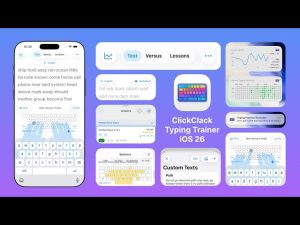
ClickClack also goes beyond traditional typing tests with features such as N-gram analysis, keyboard and hand guides, custom practice text, challenges against the CPU, multiplayer games, and customizable typing sounds.
Features
- Typing Speed Tests
- ClickClack offers targeted typing tests that allow you to measure your current typing performance. You can practice with timed sessions or choose tests based on the number of words, depending on your preferred training style.
- The results provide useful information about your speed and accuracy, helping you understand your current typing level.
- Words Per Minute and Accuracy Tracking
- ClickClack records important performance metrics such as gross words per minute, net words per minute, accuracy, and consistency. These statistics make it easy to measure improvement over several practice sessions.
- N-Grammar Word Focus Lab
- One of ClickClack’s most advanced features is its N-Grammar training system. It focuses on character sequences that commonly cause errors or slow typing.
- Keyboard and Hand Guide
- The keyboard overlay provides a visual representation of keystrokes and subsequent keys.
- Custom Text for Typing
- Users can create their own practice material using custom text.
- Computer-Assisted Mode
- ClickClack includes a competitive practice mode where you compete against simulated opponents. The CPU difficulty can be adjusted, allowing users to gradually increase the challenge as their typing skills improve.
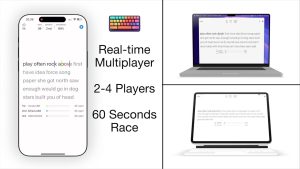
- Multiplayer Games
- For users who enjoy competitive practice, ClickClack offers real-time typing challenges.
- Customizable Typing Experience
- The application allows users to customize typography, font size, spacing, text alignment, themes, and other visual preferences.
- This flexibility makes it easy to create a comfortable typing environment for extended practice sessions.
- Typing Sound Effects
- ClickClack can add keyboard sound effects to typing sessions. Users can choose different sound styles and customize the experience to their preferences.
- iCloud Sync
- Typing statistics can be synced across compatible Apple devices via iCloud, allowing users to keep a constant record of their progress on Mac, iPhone, and iPad.
What’s New
- New storage and data settings for viewing and managing data stored in the application.
- Improved visibility of typing results, lesson results, incorrect keystrokes, N-gram statistics, and custom text storage.
- New access to Focus Lab from the menu bar.
- Quick creation of custom N-gram exercises.
- Ability to save generated Focus Lab exercises as custom practice text.
- New PPM/CPM session graphs to visualize recent typing performance.
- Improved control over local storage of custom sound packs.
- General interface improvements and bug fixes.
Pros & Cons
Pros
- Clean, distraction-free typing interface.
- Detailed tracking of words per minute and accuracy.
- Structured lessons for beginners.
- Advanced tools for practicing N-grams.
- Keyboard and hand placement guides.
- Custom text support.
- VS CPU and multiplayer modes.
- Helpful performance graphs.
- Customizable themes, fonts, and sounds.
- Sync with iCloud on Apple devices. Lightweight, native Mac experience.
Cons
- Some advanced features are available only with Pro.
- Beginners may need time to understand detailed analytics.
- AI-related features require compatible newer Apple hardware and macOS versions.
- Users looking only for a basic typing test may find the feature set extensive.
Screenshots:
System Requirements
- Operating system: macOS 14.0 or later
- Processor: Apple Silicon recommended; some features may require newer Apple hardware
- RAM: 4 GB minimum (8 GB recommended)
- Storage: Approximately 200 MB of available disk space
- Display: 1280 × 800 resolution or higher
- Internet connection: Required for updates, iCloud syncing, multiplayer features, and optional online services.
Installation Guide
- Download the ClickClack – Typing Trainer 4.5.0 installer.
- Open the downloaded installation file.
- If you’re using a DMG installer, drag ClickClack to your Applications folder.
- Launch the application from Finder or Launchpad.
- Grant the necessary macOS permissions if prompted.
- Configure your preferred typing language, theme, keyboard layout, and practice settings.
- Start with a typing lesson or speed test and begin tracking your words per minute and accuracy.
Benefits
- Improve your typing speed naturally
- ClickClack helps you type faster through regular, structured practice. Instead of focusing solely on increasing your words per minute (WPM), you can focus on accuracy and consistency as your speed gradually improves.
- Develop better muscle memory
- Repeated practice helps your fingers become familiar with the keyboard layout and common character combinations. Over time, this can reduce the need to look at the keyboard while typing.
- Identify weak typing patterns
- Detailed statistics make it easy to identify keys and character combinations that cause frequent errors. This allows you to focus your practice sessions on those specific areas.
- Practice with real text
- The ability to type custom text makes ClickClack useful beyond traditional typing exercises. Writers, developers, students, and office professionals can practice with texts similar to those they encounter in their daily work.
- Track your long-term progress
- Performance graphs and historical statistics provide a clear view of your progress. Seeing your WPM and accuracy improve over time can also make regular practice more motivating.
- Make practice more engaging
- Typing exercises can become repetitive. Challenges against the CPU and multiplayer races add a competitive element that encourages users to keep practicing.
- Learn to type more efficiently
- Keyboard and hand guides help beginners understand where to place their fingers. This provides a helpful visual reference as they develop good typing habits.
- Focus on specific errors
- The Focus Lab and N-Gram training features allow users to concentrate on difficult character sequences. This targeted approach can be more efficient than repeatedly practicing everything from the beginning.
- Useful for professional Mac users
- Those who spend a large part of their workday typing can benefit from increased speed and accuracy. Writers, programmers, researchers, customer service representatives, and office professionals can incorporate ClickClack into their daily routine.
Performance Review
ClickClack – Typing Trainer 4.5.0 for Mac offers an optimized and focused environment for improving typing skills. Instead of treating typing practice as a simple speed test, the application combines lessons, analysis, targeted exercises, and competitive modes to create a more comprehensive training flow.
The interface is responsive during typing sessions, with smooth keystroke tracking and uninterrupted performance updates. This is important for a typing trainer, as even slight delays can affect the user’s pace and test results.
One of ClickClack’s strengths is its analysis system. Words per minute (WPM) and accuracy statistics provide immediate feedback, while additional error information helps users understand where they need to improve their performance. Session graphs, introduced in version 4.5.0, also make it easy to visualize recent performance.
The N-gram Focus Lab is particularly useful for experienced typists. Instead of spending time practicing combinations they’re already comfortable with, users can focus on character sequences that consistently cause errors or slow them down. This creates a more personalized training experience.
ClickClack also works well as a long-term practice tool. Its lessons are suitable for beginners, while custom text, advanced analysis, and competitive modes give experienced users reasons to keep using the application.
Resource consumption remains reasonable during regular typing sessions. The application can run alongside a browser, text editor, development environment, or office software without becoming a major distraction.
In short, ClickClack – Typing Trainer 4.5.0 for Mac is a comprehensive typing application for users seeking measurable improvement rather than just occasional speed tests. Its combination of detailed statistics, targeted practice, customization, and competitive features makes it especially appealing to regular typists.
FAQs
- What is ClickClack – Typing Trainer 4.5.0 for Mac?
- ClickClack is a typing practice application designed to help Mac users improve their speed, accuracy, consistency, and keyboard familiarity.
- Can ClickClack record words per minute (WPM)?
- Yes. The application records typing speed in WPM and provides additional performance statistics to help users monitor their progress.
- Is ClickClack suitable for beginners?
- Yes. Structured lessons, keyboard guides, and hand position information make it suitable for those learning to type without looking at the keyboard.
- Can experienced typists use ClickClack?
- Absolutely. Advanced analysis, N-gram exercises, custom text, and competitive modes offer useful training options for experienced typists.
- What is N-gram training?
- N-gram training focuses on groups of characters that can be difficult to type. It allows users to practice specific combinations and improve their weak points.
- Can I create custom typing exercises?
- Yes. ClickClack supports custom text, allowing you to practice with your own work-related materials and content.
- Does ClickClack have a multiplayer mode?
- Yes. The app supports multiplayer typing challenges, allowing users to compete in real-time practice sessions.
- Can I compete against the computer?
- Yes. VS CPU mode allows users to compete against simulated opponents and adjust the challenge based on their skill level.
- Does ClickClack support iCloud syncing?
- Yes. Supported typing statistics can be synced across compatible Apple devices using iCloud.